 |
| Google趨勢比較結果 |
市場是不少看衰此次 iPhone 8/iPhone X的消息與傳言,就連股市裏相關的蘋果概念股一時間股價也被看空。那到底銷售情況會如何呢?
沒有甚麼大數據分析能力,但Google Trends比較一下或許能告訴我們一些答案。
#
|
| Google趨勢比較結果 |
install.packages("ggmap")
install.packages("leaflet")
install.packages("DT")
install.packages("jsonlite")
install.packages("curl")
install.packages("dplyr")

library(ggmap)
library(leaflet)
library(DT)
options(stringsAsFactors = F)

(myplace <- geocode(iconv("台北車站", "big5", "utf8")))
顯示台北火車站座標結果
      lon      lat
1 121.517 25.04774
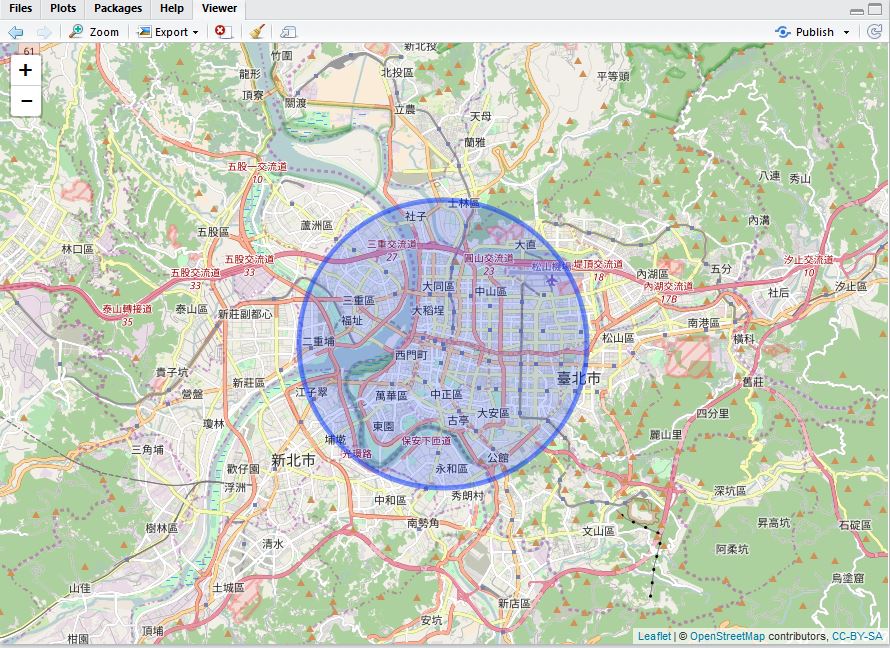
繪製出台北火車站方圓5公里(radius=5000)的範圍
leaflet() %>% addTiles() %>%
  fitBounds(0, 40, 10, 50) %>%
  setView(myplace$lon, myplace$lat, zoom = 12) %>%
  addCircles(myplace$lon, myplace$lat, radius = 5000)
 |
| 台北火車站方圓5公里 |

library(jsonlite)
經緯度 <- paste(myplace$lat, myplace$lon, sep=",")
方圓幾公尺 <- 5 * 1000
token <- "EAACEdEose0(略)ppeaL"
url <- sprintf("https://graph.facebook.com/search?type=place¢er=%s&distance=%s&limit=50000&access_token=%s", 經緯度, 方圓幾公尺, token)

tmp <- fromJSON(url)
result <- tmp$data[c("category","name","id")]
while(!is.null(tmp$paging$`next`)){
  tmp <- fromJSON(tmp$paging$`next`)
  result <- rbind(result, tmp$data[c("category","name","id")])
}

datatable(result,
          extensions = 'Scroller', options = list(
          deferRender = TRUE,
          scrollY = 500,
          scroller = TRUE
        ))
##執行結果

library(dplyr)
fields <- "name,checkins,category,location"
checkin <- sapply(result$id, function(id){
  url <- sprintf("https://graph.facebook.com/%s?fields=%s&access_token=%s", id, fields, token)
  #unlist(fromJSON(url))
  fromJSON(url)
})

mycheckin <- as.data.frame(t(checkin))
mycheckin$checkins <- as.integer(mycheckin$checkins)
mycheckin <- mycheckin[order(mycheckin$checkins, decreasing = T),]
row.names(mycheckin) <- NULL
datatable(mycheckin,
          extensions = 'Scroller', options = list(
          deferRender = TRUE,
          scrollY = 200,
          scroller = TRUE
        ))
##執行結果

import collections

s = {}
for i in range(0,36,2):
    s.update({i:str(i)*10})

sorted_s = collections.OrderedDict(sorted(s.items()))
print(s)
print('-------')
print(sorted_s)
print('=======')
for i, j in sorted_s.items():
    print('%s:%s' % (i,j))
將 dictionary s 重新排序後, 輸出次序就能正常囉~
{0: '0000000000', 32: '32323232323232323232', 2: '2222222222', 4: '4444444444', 6: '6666666666', 8: '8888888888', 10: '10101010101010101010', 12: '12121212121212121212', 34: '34343434343434343434', 14: '14141414141414141414', 16: '16161616161616161616', 18: '18181818181818181818', 20: '20202020202020202020', 22: '22222222222222222222', 24: '24242424242424242424', 26: '26262626262626262626', 28: '28282828282828282828', 30: '30303030303030303030'}
-------
OrderedDict([(0, '0000000000'), (2, '2222222222'), (4, '4444444444'), (6, '6666666666'), (8, '8888888888'), (10, '10101010101010101010'), (12, '12121212121212121212'), (14, '14141414141414141414'), (16, '16161616161616161616'), (18, '18181818181818181818'), (20, '20202020202020202020'), (22, '22222222222222222222'), (24, '24242424242424242424'), (26, '26262626262626262626'), (28, '28282828282828282828'), (30, '30303030303030303030'), (32, '32323232323232323232'), (34, '34343434343434343434')])
=======
0:0000000000
2:2222222222
4:4444444444
6:6666666666
8:8888888888
10:10101010101010101010
12:12121212121212121212
14:14141414141414141414
16:16161616161616161616
18:18181818181818181818
20:20202020202020202020
22:22222222222222222222
24:24242424242424242424
26:26262626262626262626
28:28282828282828282828
30:30303030303030303030
32:32323232323232323232
34:34343434343434343434
from numbapro import cuda, vectorize, guvectorize, check_cuda
from numbapro import void, uint8 , uint32, uint64, int32, int64, float32, float64, f8
import numpy as np
check_cuda()
------------------------------libraries detection-------------------------------
Finding cublas
 located at d:\Anaconda3\envs\tensorflow-gpu\DLLs\cublas64_70.dll
 trying to open library... ok
Finding cusparse
 located at d:\Anaconda3\envs\tensorflow-gpu\DLLs\cusparse64_70.dll
 trying to open library... ok
Finding cufft
 located at d:\Anaconda3\envs\tensorflow-gpu\DLLs\cufft64_70.dll
 trying to open library... ok
Finding curand
 located at d:\Anaconda3\envs\tensorflow-gpu\DLLs\curand64_70.dll
 trying to open library... ok
Finding nvvm
 located at d:\Anaconda3\envs\tensorflow-gpu\DLLs\nvvm64_30_0.dll
 trying to open library... ok
 finding libdevice for compute_20... ok
 finding libdevice for compute_30... ok
 finding libdevice for compute_35... ok
-------------------------------hardware detection-------------------------------
Found 2 CUDA devices
id 0    b'GeForce GTX 1060 6GB'                              [SUPPORTED]
                      compute capability: 6.1
                           pci device id: 0
                              pci bus id: 2
id 1      b'GeForce GTX 650'                              [SUPPORTED]
                      compute capability: 3.0
                           pci device id: 0
                              pci bus id: 1
Summary:
 2/2 devices are supported
PASSED
Out[1]:
True
pip freeze --local | grep -v '^\-e' | cut -d = -f 1  | xargs -n1 pip install -U

pip3 freeze --local | grep -v '^\-e' | cut -d = -f 1  | xargs -n1 pip3 install -U
另外一種方式也是可以的...
pip install -U $(pip3 freeze |awk '{split($0,a,"=="); print a[1]}')

pip3 install -U $(pip3 freeze |awk '{split($0,a,"=="); print a[1]}')
#
